
Volunteers place themselves. You watch the gaps close.
One public page collects everyone, asks the age question your event chooses, captures the waivers, and puts them on the schedule. Your team stops assembling a roster and starts filling the handful of spots still open.
Join Early Access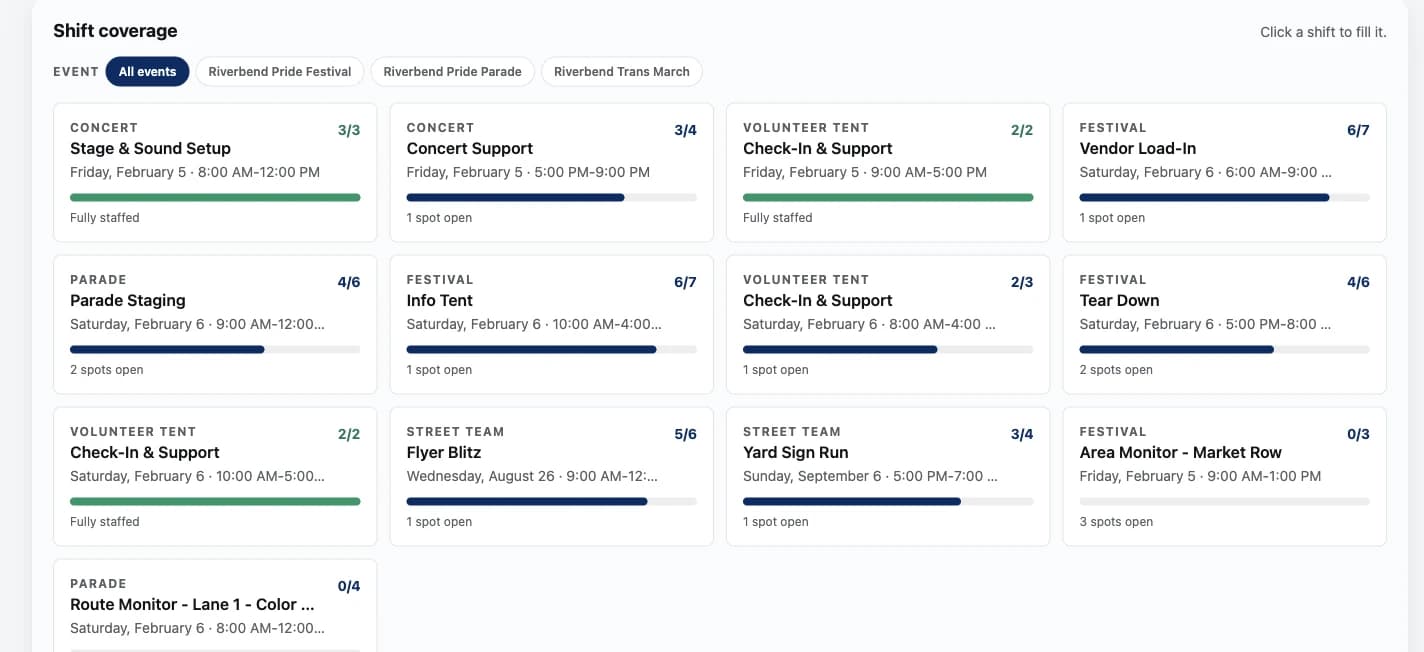
One link, and volunteers place themselves.
A short film of a volunteer signing up in the real product, with demonstration data. No sound needed.
What this film shows
- Festival, parade or march. Volunteers open one link, pick the event, then say who they are.
- Pick a shift, keep it. Every shift shows the spots left, and full shifts offer a waitlist.
- Shirt size, who to call. The details the volunteer lead needs on the day are asked up front.
- Waiver signed, right there. Photo release, code of conduct and liability waiver are signed by typing their name.
- Their shifts, confirmed. Instant-confirm shifts are theirs the moment they sign up, shown on a confirmation page.
- Closing card: Volunteers sign themselves up. Shifts, waiver and all.
Volunteer coordination fails in the gap between the signup form and the schedule.
The form collects names. Somebody then retypes them into a spreadsheet, guesses who is available, emails to confirm, and finds out on event morning that the tear-down crew is two people short. Karsenics closes that gap by making the signup and the schedule the same thing.
- A signup form that produces a list, not a schedule
- Waivers chased by email, or signed on a clipboard nobody files
- No way to know a shift is short until the morning it is short
- Last year's volunteers lost with last year's spreadsheet
Everything between “I want to help” and “thanks for coming”.
Self-select shift board
Volunteers claim the shifts that fit their weekend. Per shift you choose whether claiming confirms instantly or waits for your approval.
Put me anywhere
Volunteers who do not want to pick tell you which days they are free, and your team places them where the help is needed.
Waitlists that move
A full shift offers a waitlist. When a spot opens on an instant-confirm shift the next person is bumped up and emailed automatically.
Age rules that enforce themselves
Each event picks no age question, an 18+ confirmation, or a full birthdate. With birthdates on, a shift with a minimum age is hidden from anyone under it, and setup will not let the age check and the shifts contradict each other.
Waivers with a real record
Typed-name signatures generate a PDF per volunteer recording what they signed and when. Guardian signatures land in the same record.
Training and orientation
A portal checklist of readings and in-person sessions. Shifts that require orientation stay locked at check-in until it is done.
Groups with their own leader
A club or company reserves a block of spots, gets a link their members join through, and manages its own roster.
Check-in three ways
QR scan from a staff phone, a tablet kiosk volunteers use themselves, or an admin override that records a reason. In and out times per shift.
The form enforces the policy, so you do not have to.
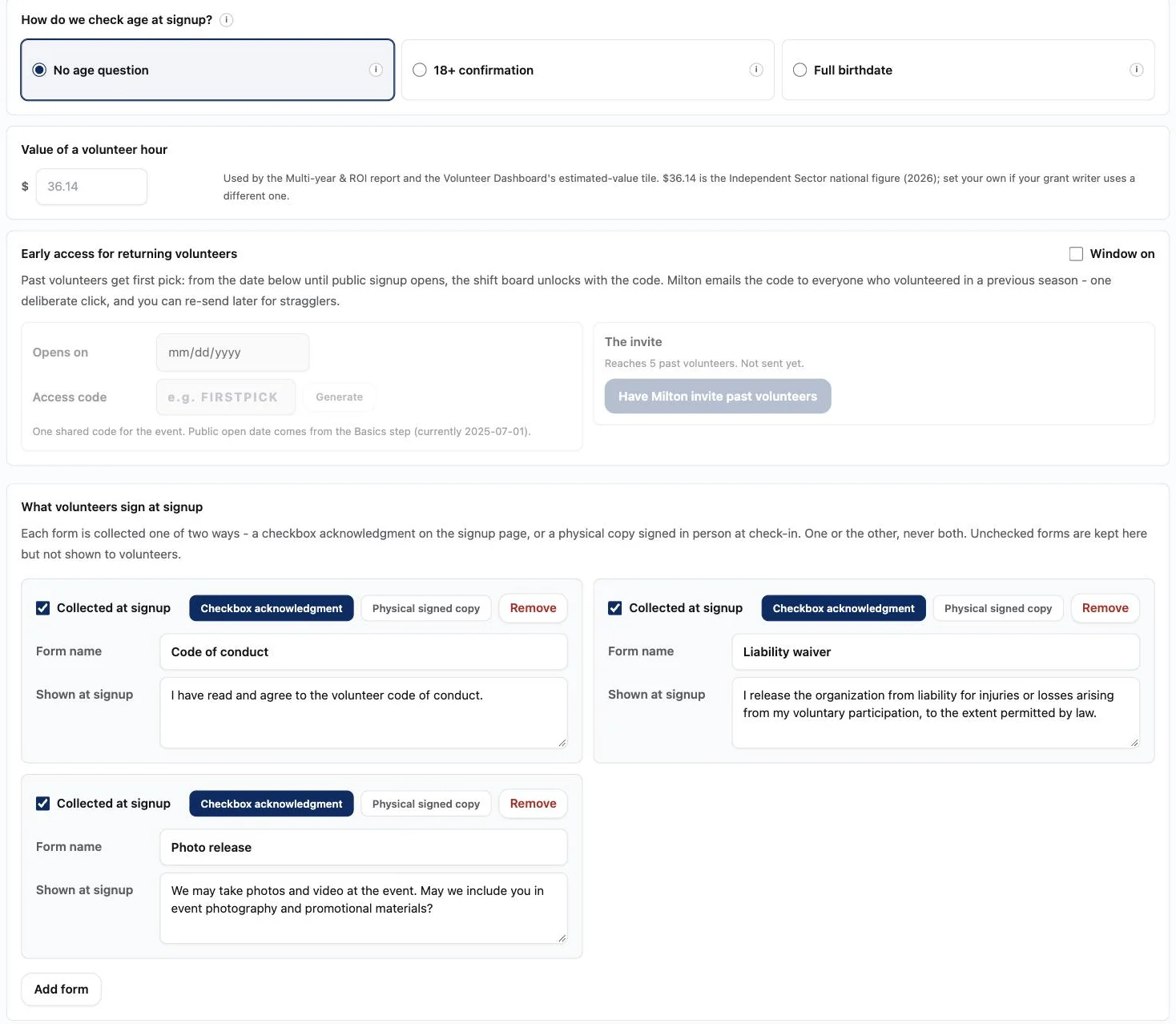
How the signup checks age, what a volunteer hour is worth for grant reports, whether past volunteers get first pick, and which forms are acknowledged on the page or signed on paper at check-in. Set it once in Volunteers setup and the public page follows it.
- No age question, an 18+ confirmation, or a full birthdate, chosen per event
- Each form collected at signup or signed in person, never both
- An early-access window for past volunteers, opened with a code Milton emails them
- A value per volunteer hour, so the multi-year report can price contributed time
A calendar, not a stack of cards.
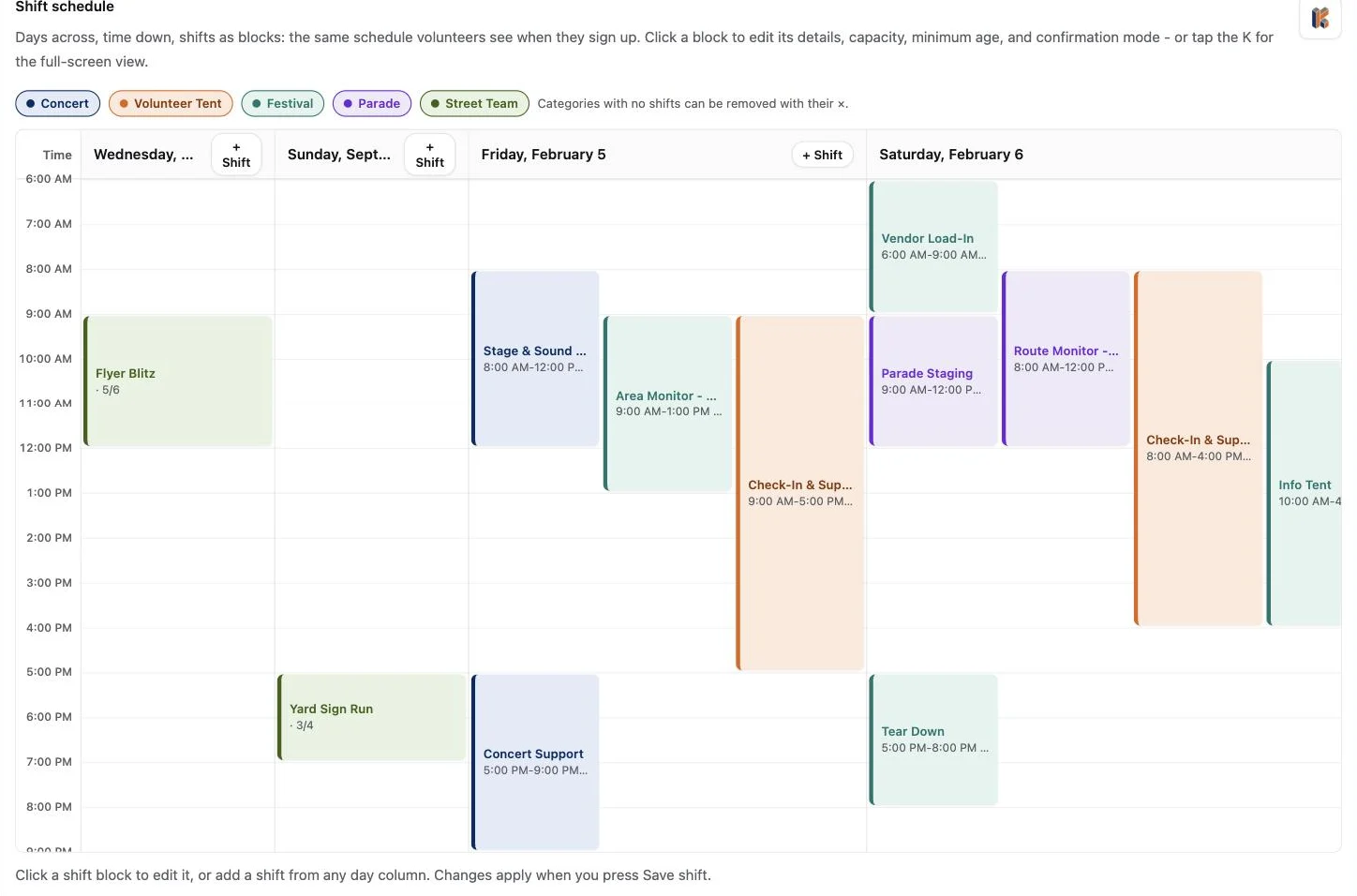
Days across, time down, shifts as blocks, in the same shape volunteers see when they sign up. Click a block to set its details, capacity, minimum age, and whether claiming it confirms instantly. Categories color the grid so a thin Saturday afternoon is obvious at a glance.
- Add a shift from any day column
- Capacity, minimum age, and confirmation mode live on the block
- Categories group concert, festival, parade, street team and volunteer tent work
- The same schedule drives the public board, the sheets, and check-in
A season a board would trust.
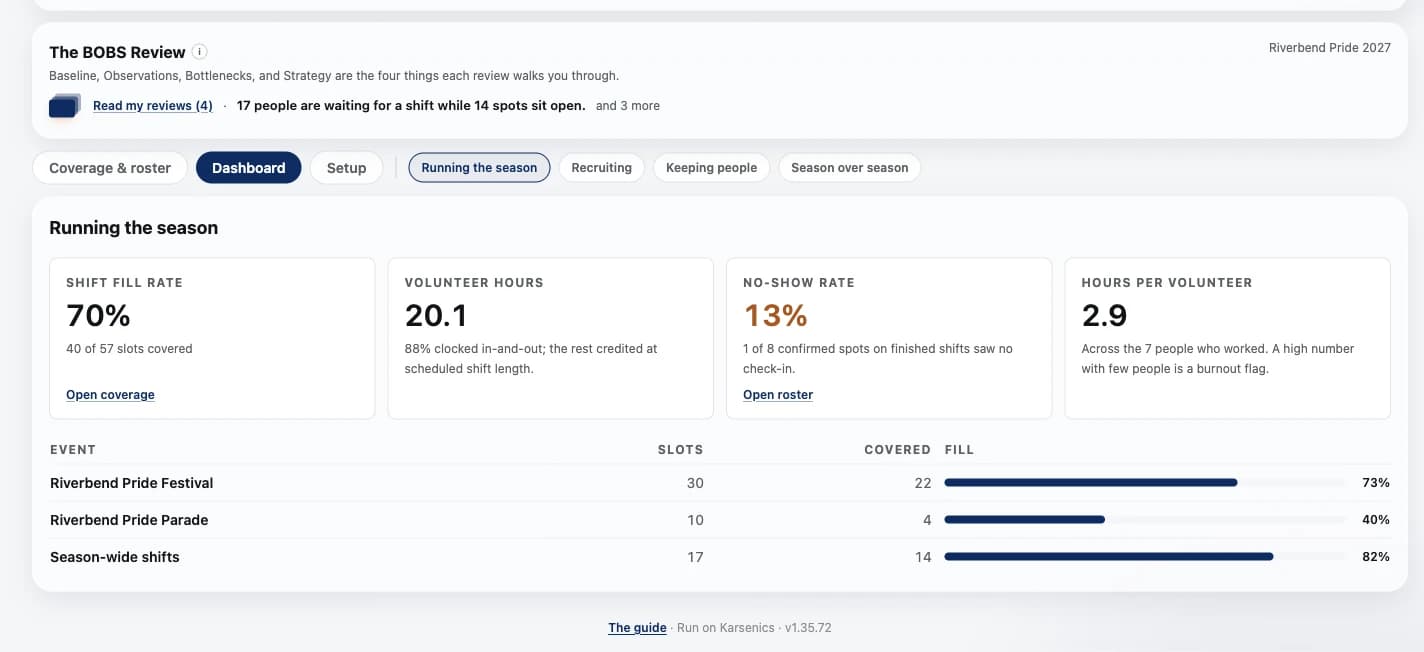
The dashboard opens on shift fill rate, volunteer hours, no-show rate and hours per volunteer, with each event's fill beside them. Recruiting, retention and season-over-season views are one click away.
- Hours say how many were clocked in and out and how many were credited at shift length
- No-show rate counted only on shifts that have finished
- Hours per volunteer, so one person carrying the schedule shows up
- Milton emails every confirmation, so nobody waits on you to write it
Straight answers before you ask.
How many volunteers can Karsenics manage?
Volunteers never pay to sign up, and Karsenics doesn't charge your organization by how many you have, so it costs $0 whether you schedule 20 people or 2,000. Each organization also gets its own Karsenics site and its own database.
Is it only for one-time events, or can it run year-round shifts too?
Both. Event shifts show on that event's signup page. Year-round shifts, like office help, a committee or a monthly sort, have their own signup page and never show up on your festival or parade signup page. Any shift can repeat every day, week, other week or month, up to 52 dates, and volunteers can take every date with one button.
Does it handle waiver signing and mobile check-in?
Yes. Volunteers agree to your waivers and forms when they sign up, a minor needs a parent or guardian's typed signature, and each volunteer can download their own signed record. On the day, they show the code on their volunteer page and get checked in from a staff phone or at a tablet kiosk at the volunteer tent.
How many volunteers does your event run on?
Tell us how your volunteer weekend is built and we will walk through what it looks like here.